COMET Update – Workaround Blocked Connections

In my instance it turns out the connection wasn’t blocked because of browser issues – it was completely server side.
In my comet controller, before I got into my JS output loop, I issued a session_write_close();

That’s all it took.
Thanks, stackoverflow

COMET Update – Iframes block AJAX

AJAX and COMET do not peacefully co-exist.

You’ve been warned.

While the COMET iframe is loading, no ajax calls will complete – the ajax calls are blocked by the loading iframe.

Workarounds:

  1. Remove ajax from the page
  2. have the code that initiates ajax calls suspend the comet and re-initialize it after the ajax is done
  3. Change to web sockets – that’s where I’m heading.

Make for Mac OS X

After many failed searches and much frustration I finally found a download for the Command Line Tools for Xcode.

Visit:

https://developer.apple.com/downloads/index.action

Then search for command line tools

The only checkbox you should have checked is “Developer Tools”

Reference the following screenshot:
Screenshot showing search options

Fantastic Friday Function – Alternate with Namespace

Here’s a freebie that can be used immediately without any supporting libraries. This will be available in the near future in my opensource php framework: tgsf It’s released under the GPLv3.

Use it like this:

<?php

for ( $ix = 0; $ix < 10; $ix++ )
{
	echo alternateNs( 'one', '1','2' ) . PHP_EOL;
	echo alternateNs( 'two', 'a','b' ) . PHP_EOL;
}

And here is the function:

<?php

/**
* Alternate with a namespace
* The first argument is a namespace to enable multiple calls in a single loop
* Call with a set of arguments and this function will return them based on a modulus of the quantity of invocations
* in other words, each time you call this function it will return the next item in the list of parameters.
* to reset, call with a namespace and different arguments
*/
function alternateNs()
{
	$args = func_get_args();
	$ns = array_shift( $args );
	$argCnt = count($args);

	if ( empty( $ns ) )
	{
		throw new Exception( 'alternateNs called without a namespace' );
	}

	static $cache = array();

	if ( empty( $cache[$ns] ) )
	{
		$cache[$ns]['current'] = 0;
		$cache[$ns]['items'] = array();
	}

	$items =& $cache[$ns]['items'];
	$current =& $cache[$ns]['current'];

	if ( ! ( $items === $args ) || $argCnt == 0 )
	{
		$current = 0;
		$items = $args;
	}
	else
	{
		$current++;
	}

	return $argCnt>0?$args[$current % $argCnt]:'';
}

Software PIE – A Tasty Best Practice

I’ve written a lot of program code.  I’ve written complete programs.  I’ve written code only to throw it away.  I’ve taken over projects where my recommendation was to start over – the code was that bad.  This has led me to ponder…

What makes code bad or good.

There’s no pat answer. Software development is both an art and a science, and anyone who tries to sway you to one camp over the other is either an artist or a scientist.

I’m coming up on the 3 year mark on a project that has grown and had tons of features added to it.  This means this topic has been on my mind a lot as I’ve been pondering the science of chaos management since changing software is nothing but chaos.

I’d like to present three practices that have helped me over the last decade, and more specifically over the last three years to keep chaos damped – manageable. These are not the only practices that will help manage changing software requirements, but I believe that they are very implementable and will give measurable results.

You may agree or disagree with me – I welcome all levelheaded comments – if you’re here to pick a fight, your comment will be deleted without remorse.

I use an acronym for these 3 ideas: PIE.

Positive Comparison Logic

For the love of all that is good in this world, please do not use negative logic names for functions that return boolean values. Consider the following two examples:

Good Example

<?php
if ( isValid() )
{
    // do amazing things here
}

Bad Example

<?php
if ( ! isInvalid() == false )
{
    // do something here that may or may not actually be needed...
}

Which would you rather maintain? The first example can be understood with a literal glance.

Inclusive queries

Include more fields and tables in your queries.  Reduce trips to db, reduce maintenance later (no need to go back and edit queries later). If you really need to optimize a query, you can do so after initial development is done. The development process is not the time for pinching performance pennies – make your life easier, make the life of template developers easier: make more, not less data available in result sets. At the very least, give an option to do a low/full detail query as in the following example.

Example using tgsf’s query class

class someModel
{
    public function fetch( $record_id, $fullDetail = false )
    {
        $q = query::factory()
            ->select()
            ->from( 'txn' )
            ->join( 'account', 'account_id = txn_account_id' )
            ->join( 'bank_account',  'bank_account_id = txn_bank_account_id' )
            ->where( 'txn_id = :txn_id' )
            ->bindValue( 'txn_id', $txn_id, ptINT );

        if ( $fullDetail )
        {
            $q->join( 'entity', 'account_entity_id = entity_id' );
            $q->join( 'login', 'entity_login_id = login_id' );
            $q->join( 'account_type', 'account_type_id = account_account_type_id' );
            $q->join( 'login_related', 'txn_login_related_id=login_related_id' );
            $q->join( 'cost_table', 'login_related_cost_table_id=cost_table_id' );
        }

        return $q
            ->exec()
            ->fetch_ds();
    }
}

Bonus tip Call functions with boolean arguments with the var name embedded in your call. This creates self-documenting code

$model = new someModel();
$model->fetch( 123, $fullDetail = true );

The query generated by the example code

SELECT * FROM txn

LEFT OUTER JOIN account ON ( account_id = txn_account_id )
LEFT OUTER JOIN bank_account ON ( bank_account_id = txn_bank_account_id )
LEFT OUTER JOIN entity ON ( account_entity_id = entity_id )
LEFT OUTER JOIN login ON ( entity_login_id = login_id )
LEFT OUTER JOIN account_type ON ( account_type_id = account_account_type_id )
LEFT OUTER JOIN login_related ON ( txn_login_related_id=login_related_id )
LEFT OUTER JOIN cost_table ON ( login_related_cost_table_id=cost_table_id )

WHERE 1=1 AND txn_id = :txn_id 

Explicit field names

This is accomplished by a structured naming approach to fields. What is the point of having 50 tables all with a field named ‘id’? At some point you’ll be aliasing or renaming that field in the application layer – all over the place. Again, what’s the point?

I’ve been using, and will use until I die, the following methodology of database structure.

  • Descriptive table names. The shorter the better – make it the best but shortest name you can, but do not abbreviate unless it’s a generally accepted abbreviation in the general population of non-developers. eg: PO for purchase order, TXN for transaction, etc.
  • Descriptive field names. Same logic, but make sure you can tell what the field is used for.
  • Field names will be prefixed with the table name. This means that in the user table, the primary key might be: user_id. other fields: user_username, user_email, etc.
  • If you do decide to do this you have to always abide by it or you’ll hate it. If you have to look up how/if you abbreviated the table name prefix on the fields of different tables you’ll hate it. Doing so is a huge mistake.

In conclusion

I’ve been using these approaches successfully since 2009 – many many changes later have proven the last 2 to be the most valuable – saving me tons of time, making it easy to write queries and work with the database. Other developers who have worked on the project have commented how they like the database structure and how it “just makes sense.”

I’d like to hear your thoughts on these approaches – if you use them, if you hate them (please tell me why).

New Open-Source Tool for Slow HTTP DoS Attack Vulnerabilities

Download the tool here

“Slow HTTP attacks are denial-of-service (DoS) attacks that rely on the fact that the HTTP protocol, by design, requires a request to be completely received by the server before it is processed. If an HTTP request is not complete, or if the transfer rate is very low, the server keeps its resources busy waiting for the rest of the data. When the server’s concurrent connection pool reaches its maximum, this creates a denial of service. These attacks are problematic because they are easy to execute, i.e. they can be executed with minimal resources from the attacking machine.”


An obvious JavaScript problem with solution (jQuery)

Today I was working with jQuery in a JavaScript file, and jQuery kept coughing up a strange error that was puzzling.

elem.nodeName is undefined

Inspecting the backtrace in firebug led me to this line

$( 'td.qty_sel :input' ).live( 'change', ns.viewModel().qtyChange() );

Seasoned JavaScript developers will probably spot the problem immediately, but it took me some time (and a developer friend) to figure it out.

He said, “because your function is not a function reference, it’s a function call

A few seconds and a corrected script later and it was working.

$( 'td.qty_sel :input' ).live( 'change', ns.viewModel().qtyChange );

Take away:

  1. When referencing existing functions in a jQuery event handler, don’t call the function  (duh) – remove the parens (duh).

🙂

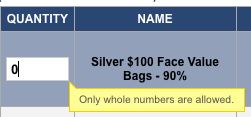
jQuery Integer Only Text Inputs using qTip for notification

I needed a great, unobtrusive way to notify a web site visitor that they can only enter whole numbers into fields on a web form. This is the JavaScript I came up with using jQuery and qTip  This is easily modified to support numeric characters of any sort – decimal points, commas, whatever you want.  It does not enforce any particular rules – it is primarily a keystroke filter.

I allow numbers and navigation keys, but disallow everything else. The code is documented inline.

Please don’t forget that if you use this to not rely on it for anything except relieving user frustration. You should always do server side validation as well

And this is the way it looks in my project:

.

One thing I should note: I’m using this together with Knockout.js  without any weird side effects – they are working nicely together.

$(function()
{
    $('input.intOnly' ).live( 'paste',
    function(event)
    {
        // we could loop across the value and validate it, but I'm too lazy
        event.preventDefault();
    });

    $("input.intOnly").live( 'blur',
    function( event )
    {
        $(this).qtip('destroy');
    });

    $("input.intOnly").live( 'keydown',
    function( event )
    {
        if (
            event.keyCode == 46  || // delete
            event.keyCode == 8   || // backspace
            event.keyCode == 9   || // tab
            event.keyCode == 224 || // command key on mac
            event.keyCode == 18  || // alt key
            event.keyCode == 16  || // shift key
            event.keyCode == 17  || // control key
            ( event.keyCode >= 48 && event.keyCode <= 57  ) || // numbers
            ( event.keyCode >= 96 && event.keyCode <= 105 ) || // numeric keypad
            ( event.keyCode >= 37 && event.keyCode <= 40  )    // arrow keys
        )
        {
            return;
        }
        event.stopImmediatePropagation();
        event.preventDefault();
        $(this).qtip(
        {
            content: 'Only whole numbers are allowed.',
            show: { ready: true },
            hide: { fixed: true, delay: 100000 }
        });
    });
});

PHP based COMET Using iframes

So I’m doing some research into, and will probably be using COMET for a project I’m working on. Yes, I know that the Apache-PHP combination is not the best for COMET, however this will be on an administrative dashboard with one or two simultaneous users at most.  I’m no COMET expert – this is my first foray into the technology.  If I learn amazing things while doing a live implementation I’ll write more articles.

While searching I ran across several tutorials and some code, but nothing that was a simple 2 file “Here’s how it’s done” example.

The basic premise (this is not new stuff – I ran across stuff from the mid 2000’s while searching) is that you have an iframe that loads a long-running PHP script that is generating <script> tags.  The JavaScript in these tags must reference the parent document.  In my test code I’m referencing a function defined in the parent document.

Some takeaways:

  1. If the script that’s referenced by your iframe doesn’t output enough data before it starts outputting <script> tags, you’ll see a delay until some sort of buffer is filled up.  I’m blaming Firefox, but I’m not certain as I didn’t investigate further.  You’ll notice a bunch of white space in my sample code – that’s a whole ton of spaces to stop the delay I was seeing in Firefox.
  2. On localhost this is very fast.  I had to introduce a usleep into the code so that it wouldn’t be so fast as to be unusable.  I haven’t tested against a remote web server, but I can assure you this will be dramatically faster than ajax polling.
  3. Firefox’s javascript engine seems to process the <script> tags being returned in the iframe faster than the DOM is able to update. I view this as good news.
  4. You must output the opening and closing script tags each time you want to update the browser.  Leaving them out will cause the browser to wait until the request is loaded – the opposite of what we’re trying to accomplish.

The example code is not an infinite loop – it’s a long running script (just a very long for loop).  In practice I’ll be using other factors to determine when to break out of an output loop.  The project requirements call for this to be running for hours so we’ll find out if that tests the limits of what this approach can handle.

Download the code

Double Reference Variable Assignments in PHP

I just got through tracking down a very pernicious bug.

The problem was that an array assigned to an object was retaining its original link after cloning.  The original array was created with its values being assigned by reference.  This wouldn’t have been a problem in and of itself, but additionally there was a second array being created with a reference to the same variable.  This was both unnecessary and certain death to my script.

The takeaway from this is to avoid unnecessary variable assignment by reference. The original code was written over two years ago.

If I recall correctly my justification for using references was to save memory.

This is wrong.

Don’t think about references in a context of memory consumption (especially since PHP allocates on write), think about references in a context of “How do I need to treat this data?”

Here is the full script that is broken. Notice in the foreach two referential assignments.

$in = array( 'a' => '123', 'b' => '456' );
$vars = array();

foreach( $in as $key => $val )
{
	$_GET[$key] =& $val;
	$vars[] =& $val;
	unset( $val );
}

class test
{
	protected $_data;

	public function set( $data )
	{
		$this->_data = $data;
	}

	public function setVar( $key, $val )
	{
		$this->_data[$key] = $val;
	}
}

header( 'content-type: text/plain' );

echo 'Should be 123 and 456' . PHP_EOL;
var_dump( $_GET );

$test = new test();
$test->set( $_GET );

echo 'Should be 123 and 456' . PHP_EOL;
var_dump( $_GET );

$second = clone $test;
$second->setVar( 'a', 'abc' );

echo 'Should be 123 and 456' . PHP_EOL;
var_dump( $_GET );

Output

Should be 123 and 456
array(2) {
  ["a"]=>
  &string(3) "123"
  ["b"]=>
  &string(3) "456"
}
Should be 123 and 456
array(2) {
  ["a"]=>
  &string(3) "123"
  ["b"]=>
  &string(3) "456"
}
Should be 123 and 456
array(2) {
  ["a"]=>
  &string(3) "abc"
  ["b"]=>
  &string(3) "456"
}

Corrected Script

$in = array( 'a' => '123', 'b' => '456' );

foreach( $in as $key => $val )
{
	$_GET[$key] = $val;
}

class test
{
	protected $_data;

	public function set( $data )
	{
		$this->_data = $data;
	}

	public function setVar( $key, $val )
	{
		$this->_data[$key] = $val;
	}
}

header( 'content-type: text/plain' );

echo 'Should be 123 and 456' . PHP_EOL;
var_dump( $_GET );

$test = new test();
$test->set( $_GET );

echo 'Should be 123 and 456' . PHP_EOL;
var_dump( $_GET );

$second = clone $test;
$second->setVar( 'a', 'abc' );

echo 'Should be 123 and 456' . PHP_EOL;
var_dump( $_GET );

Correct Output

Should be 123 and 456
array(2) {
  ["a"]=>
  string(3) "123"
  ["b"]=>
  string(3) "456"
}
Should be 123 and 456
array(2) {
  ["a"]=>
  string(3) "123"
  ["b"]=>
  string(3) "456"
}
Should be 123 and 456
array(2) {
  ["a"]=>
  string(3) "123"
  ["b"]=>
  string(3) "456"
}