A Vision for Teaching Children

A Vision for Teaching Children

Originally published 2/24/2014, updated 10/1/2020, 12/13/2022

To instill a lifelong love of learning.

By encouraging curiosity, question-asking and interruptions.

By setting up fences and borders for the learning experience
wide enough to never be noticed.

Because gentle guidance keeps a student approximately in the center
of their thousand-mile-wide educational experience.

With the use of goals and results as a way to measure success
not of the student, and not of the teacher
but of the approach used to teach
and for the purpose of celebrating successes.

With a strong focus on the individual student’s learning style
so their curious nature is not crushed
and their intellectual boundaries are not artificially limited
through the drive to achieve arbitrary results
to satisfy a pointless numerical goal
that has nothing to do with actual intelligence or learning.

Understanding that the result of a fully engaged student
who has been taught to love learning
who has been allowed to ask unrelated questions
who has never heard, “you are special” nor “you are ignorant”
(despite being both)
and who has been carefully guided without visible boundaries

Will be a person who will produce amazing results
who will never stop learning
who will never know any intellectual limits
who will be able to create anything
and will never cease to amaze the world.

Photo by Belinda Fewings

The Mac equivalent of the Apple ][ speed command

How to slow your connection down, or the Mac equivalent of the Apple ][ speed command.

found here

Configure a pipe that has the appropriate bandwidth limit and delay.
sudo ipfw pipe 1 config bw 16Kbit/s delay 350ms

Attach it to all traffic going to or from port 80.
sudo ipfw add 1 pipe 1 src-port 80
sudo ipfw add 2 pipe 1 dst-port 80

Now traffic coming from or going to port 80 anywhere is limited by the pipe that you specified. Do your testing and once you get frustrated with slow access to the web remove the rules like so:
sudo ipfw delete 1
sudo ipfw delete 2

Finally, delete the now defunct pipe like so:
sudo ipfw pipe 1 delete


put together in one bash script – adjust the kbit/s and delay to suit your needs

sudo ipfw pipe 1 config bw 56Kbit/s delay 500ms
sudo ipfw add 1 pipe 1 src-port 80
sudo ipfw add 2 pipe 1 dst-port 80
#
read -t 1600 -p "Hit ENTER to restore"
sudo ipfw delete 1
sudo ipfw delete 2
sudo ipfw pipe 1 delete

Finally SFTP/SSH WordPress Updating

A simple link should suffice.  Leave a comment if you find the plugin has been removed from the WordPress plugin directory and I’ll resurrect it from one of my sites.

http://wordpress.org/plugins/ssh-sftp-updater-support/

How big is BIGINT?

As I was trying to decide if a bigint column would hold enough values to store historical data in a database, and storage problems aside, this helped me put it into perspective, and decide that, yes, for now, bigint would be big enough for me.

eighteen quintillion, four hundred forty six quadrillion, seven hundred forty four trillion, seventy three billion, seven hundred nine million, five hundred fifty one thousand, six hundred fifteen

Some perspective:
~ 1 trillion pennies (click for details) (Sear’s Tower, Empire State Building & others for scale)

~ 1 Quadrillion pennies (click for details)

~ 1 Quintillion pennies (click for details)


BIGINT provides 18.446 quintillion unique values.

SUMs, Joins and COALESCE in MySQL

Recently I ran into a problem with a query. I was trying to add the sums of two columns together, one of the columns happened to be in a table that was LEFT OUTER JOINed and the result was NULL when it should not have been.

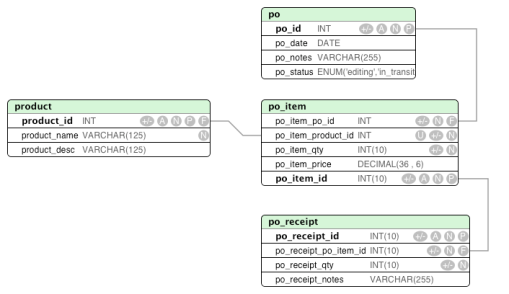
This is for a purchase ordering system and is the calculation to get the total of inventory that is in transit, taking into account partial receipts of inventory.

Here is my table structure
sums-and-joins-tables

select SUM( po_item_qty ) - SUM( po_receipt_qty ) as on_order

from po_item

left outer join po_receipt on ( po_receipt_po_item_id = po_item_id )
left outer join po on ( po_item_po_id = po_id )
left outer join product on ( po_item_product_id = product_id )

where po_status = 'in_transit'

This produces a result of ‘NULL’ when I know perfectly good and well that I have in transit purchase orders with po_item records.

It turns out that subtracting the po_receipt_qty when there are no matching po_receipt records (LEFT OUTER JOIN records return null when missing ) turns into, for example, 100 – NULL which always returns NULL.

What I need is for this to turn into 100 – 0, returning 100.

COALESCE to the rescue!

The query that made it work:

select SUM( po_item_qty ) - COALESCE( SUM( po_receipt_qty ) ,0 ) as on_order

from po_item

left outer join po_receipt on ( po_receipt_po_item_id = po_item_id )
left outer join po on ( po_item_po_id = po_id )
left outer join product on ( po_item_product_id = product_id )

where po_status = 'in_transit'

Typing in a box on the internet.

Most people do not believe they should need to expand their education in any way whatsoever prior to typing in a box on the internet.

They just don’t. So, if you want any shot at getting them to read a primer, you need to make it easy on the eyes, and keep it to a length that respects their time, rather than one that implies that they may need to secure some provisions or sled dogs prior to proceeding.

http://blog.stackoverflow.com/2013/01/about-page-2-0-the-quickstartening/

Buttons in Forms in IE7

I’m using <button> tags in my forms for submit buttons using jquery ui to get icons.  They weren’t working in IE7.  This explains why:

http://probablyprogramming.com/2009/10/30/ie7-requires-typesubmit-for-button-elements

bottom line:

include type=”submit” inside your button and it’ll work.

Zend Framework – ZendMail timeout in validate hostname on a mac

I develop on a Mac. I love my Mac. I use Mamp Pro for my *amp stack. After beating my head against the wall for a couple of hours, including several trips to GoogleLand, I finally found a stackoverflow article about iconv_strlen causing execution timeouts.

I am now upgraded to Mamp Pro 2.x.

Happy news: it upgraded my mysql without losing any data – in fact I didn’t need to do anything.

Concerning news: it warned me that my “templates” had changed. I had changed my php.ini files. That might prove to be a pain down the road – we’ll see. I did take a backup of them.

Database and Error Logging in a Well-Structured Web Application

Problem:

You have a well-written web application. It’s throwing exceptions, you’re handling the exceptions.  You’re starting db transactions and committing or rolling them back.  You are logging exceptions and errors to your database for forensics and review.

Two to three years pass, the web application, because it’s well written, modular and de-coupled, has grown and you’ve added new features – perhaps even released several major updates – suddenly you realize that not all logging is getting recorded.  Somehow, through the complexity of exception handling and commits and rollbacks you have gotten to the point where you are accidentally rolling your logging inserts back.  You may have alerted the dev team but there’s nothing recorded for them to review.

I have good news.

There is a solution.  It’s simple, and obvious (perhaps so obvious you’ve already taken this step yourself).

Use a different database connection. Transactions are connection specific.  Rolling back on your main database connection will leave your logging connection untouched.

If you’re going to use a different database connection, you might as well take the time to move your logging to a separate database as a best practice.

You should also employ lazy connecting – don’t connect to your logging db unless you need to log something.

Warning

Make sure you know which db connection to use if you’re using mysql and need the last insert id from an auto-increment logging table id.